






Éischt Schrëft gratis · Keng Kreditkaart · TTF/OTF/WOFF/WOFF2
60
languages in one family, across 9 writing systems
< 1 min
from a sentence to installable font files
TTF
plus OTF, WOFF and WOFF2 — real files that work offline
Three ways to start
Say what you want in plain words — “heavy geometric sans with squared corners”. Best when the font exists only in your head.
KI-Schrëftgenerator → 02 Start from a pictureA logo, a poster, a photo of a sign. Best when you have seen the style and want the whole alphabet in it.
Eng Schrëft aus engem Bild maachen → 03 Start from your handwritingPhotograph a few lines you wrote. Best when the font has to be unmistakably your own style.
Maacht aus Ärer Handschrëft eng Schrëft →How to create your AI font in 30 seconds
60 Sproochen · 9 Schrëftsystemer · ee Saz
Maacht Är eege Schrëft — gratis
Beschreift déi Schrëft, déi Dir wëllt, oder luet e Bild erop. Dir kritt richteg, installéierbar Schrëftdateien — keng Virschau.
TTF · OTF · WOFF · WOFF2 Thin · Regular · Bold All Zeechen ännerbar Déi éischt Schrëft gratis
Beschreift d'Schrëft (oder hänkt e Referenzbild un) — déi komplett Schrëft ass an ongeféier enger Minutt prett. Éischt Schrëft gratis.
Eng eege Schrëft maachen ouni Designsoftware: beschreift an engem Saz, wéi eng Schrëft Dir wëllt, oder fänkt mat engem Bild oder Ärer eegener Handschrëft un. YoFont zeechent de ganze Zeechesaz, bis zu dräi Schnëtter a bis zu 60 Sproochen iwwer 9 Schrëftsystemer, an iwwerreecht Iech richteg TTF-, OTF-, WOFF- an WOFF2-Dateien. All Glyph bleift am Studio ännerbar. Déi éischt Schrëft ass gratis a verlaangt keng Kaart.
Dës Woch am Trend
Wéi et funktionéiert
Eng Stëmmung, e Briefing oder e Referenzbild — normal Wierder duerginn.
De ganze Zeechesaz gëtt gezeechent an an ongeféier enger Minutt zu enger funktionéierender Schrëft zesummegesat.
All Glyph am Studio upassen, duerno TTF/OTF/WOFF/WOFF2 eroflueden oder iwwer de CDN abannen.
Dacks gestallte Froen
Wéi maachen ech gratis meng eege Schrëft?
Beschreift se uewen am Feld a generéiert — déi éischt Schrëft kascht näischt a fir keng Kaart gefrot. Dir kritt installéierbar TTF-, OTF-, WOFF- an WOFF2-Dateien, kee Bild vun Text.
Muss ech mech mat Schrëftdesign auskennen?
Nee. Dir braucht eng Meenung dozou, wéi d'Schrëft wierke soll. Den Entworf kënnt komplett; Är Aufgab ass ze mierken, wéi eng Buschtawen net stëmmen, an déi ze fléken — an dat léisst d'Studio Iech Glyph fir Glyph maachen.
Kann ech meng Schrëft kommerziell benotzen?
Jo, mat enger kommerzieller Lizenz — si deckt Logoen, Verpackungen, Clientsaarbecht a bezuelte Produkter of. Fir privat an netkommerziell Notzung braucht Dir näischt extra. Dir kritt richteg Dateien, déi installéieren an och offline weider funktionéieren.
Kann ech och eng Schrëft aus menger Handschrëft oder engem Bild maachen?
Jo — béides ass dee selwechte Generator mat engem Bild dobäi. Fotograféiert e puer Zeile vun Ärer Handschrëft oder luet e Logo oder e Plakat erop, an de Stil gëtt op eng komplett Famill ausgedehnt.
Wéi eng Dateiformater kréien ech?
All Schrëft gëtt als TTF, OTF, WOFF a WOFF2 exportéiert, dobäi CDN-gehost @font-face-URLen fir d'Web.
Maacht elo Är Schrëft
Schrëft generéieren — gratisDéi éischt Schrëft gratis · Keng Kreditkaart · KI-Schrëftgenerator
Wéi Dir Är eege Schrëft gratis maacht, ouni Designsoftware
Eng Schrëft ze maachen war fréier en Handwierk mat enger laanger Léierzäit: all Buschtaf zeechnen, all Paar ofstänneg maachen, a jidder Gréisst testen. Dee Wee gëtt et nach ëmmer, an hie bleift dee beschten, wann Dir Schrëftdesign léiere wëllt. Wann Dir awer einfach eng Schrëft braucht, déi soss keen huet, da bréngen Iech véier Schrëtt dohin.
- Sot, wéi se sech ufille soll. Konkret schléit poetesch. „Schmuele Grotesk, schwéier, flaach Enden, enge Ofstand“ gëtt e schäerfert Resultat wéi „modern a propper“, well all eenzelt vun dëse Wierder eng Entscheedung ass, mat där den Entworf eppes ufänke kann.
- Wielt Sproochen a Schnëtter, ier Dir generéiert. Eng Famill, déi fir Latäin a Kyrillesch zesumme gezeechent gouf, hält hir Proportiounen besser wéi eng, déi een duerno drugesat huet. Bis zu dräi Schnëtter, bis zu 60 Sproochen iwwer 9 Schrëftsystemer, an engem eenzege Duerchgang.
- Liest den Entworf, kuckt en net just un. Tippt e richtege Saz, net „ABC“. D'Problemer an enger Schrëft liewen am Rhythmus tëscht de Buschtawen, an e Wuert, dat Dir wierklech benotzt, weist se Iech méi séier wéi d'Alphabet an der Rei.
- Fléckt d'Buschtawen, déi Iech stéieren, an exportéiert dann. All Glyph kann eenzel nei gezeechent oder nei generéiert ginn. Wat Dir erofluet, ass eng ganz normal Schrëftfamill, TTF, OTF, WOFF a WOFF2, déi op all Maschinn installéiert a fir ëmmer offline funktionéiert.
Wat „gratis“ hei tatsächlech heescht
Déi éischt Schrëft ass gratis a brauch keng Kaart. Et ass eng komplett Famill, kee Mustere mat Waasserzeechen a kee Bild vun enger Schrëft: installéiert d'Dateien a benotzt se. Déi meescht Resultater fir „free custom font generator“ sinn weder dat eent nach dat anert. Si rennere Ären Text als Bild an hale sech do op.
No der éischter kaaft Dir entweder Glyphen no Bedarf oder Dir huelt e Plang, an eng kommerziell Lizenz, wann d'Schrëft an bezuelten Aarbechte landet. Dat ass déi ganz Präisgeschicht. Et gëtt keng Zuel vu Sëtzer, keng Aflafzäit op Dateien, déi Dir schonn erofgelueden hutt, an näischt hält op ze funktionéieren, wann Dir fortgitt.
Schrëftmaacher géintiwwer der Handaarbecht
Vun Hand heescht Glyphs, FontForge oder RoboFont, plus d'Liesen, fir se gutt ze benotzen. Ee Schnëtt mat Grouss- a Klengbuschtawen, Zuelen a Satzzeechen ass eng Woch konzentréiert Aarbecht fir een, dee schonn weess, wat hie mécht, a wesentlech méi laang fir een, deen et léiert. Setzt Kyrillesch oder Griichesch derbäi, an d'Zäit verduebelt sech.
D'Generéiere dréint ëm, wéi ee Stéck deiert ass. Dir fänkt bei enger kompletter Famill un a setzt Äert Uerteel do an, wat falsch ass, amplaz Är Stonnen an dat, wat souwisou kloer ass. D'Handwierk verschwënnt net, d'Entscheedung, datt de g ze zou ass, bleift Är. Mee Dir trefft se a Minutten an net no Deeg vum Zeechnen.
YoFont, Calligraphr oder FontStruct: wat passt
Selwecht Sich, dräi verschidden Aarbechten. Calligraphr mécht aus Ärer Handschrëft eng Schrëft iwwer gedréckte Virlagen, déi Dir ausfëllt, scannt an eroplued. FontStruct baut Buschtawen aus Zillen op engem Raster. YoFont entwërft déi ganz Famill aus engem Saz oder engem Bild, an all Sprooch an all Schnëtt, deen Dir wëllt, a gëtt Iech duerno e Studio, fir eenzel Buschtawen ze korrigéieren. D'Tabell weist, wou jidderee vun hinne stoe bleift.
| YoFont | Calligraphr | FontStruct | |
|---|---|---|---|
| Ausgangspunkt | E Saz, e Bild oder Är Handschrëft | Eng gedréckte Virlag, déi Dir vun Hand ausfëllt | Zillen, déi Dir op e Raster setzt |
| Zeechne néideg | Nee. Eenzel Buschtawe fléken, wann Dir wëllt | Jo, all Zeechen | Jo, all Zeechen |
| Sproochen an engem Duerchgang | 60 Sproochen, 9 Schrëftsystemer | Wat Dir selwer zeechent | Wat Dir selwer baut |
| Schnëtter | Thin, Regular a Bold aus enger Beschreiwung | Ee pro Virlag | Ee pro Bau |
| Resultat | TTF, OTF, WOFF a WOFF2, plus e CDN-Link | TTF an OTF | TTF |
| Am beschte fir | Eng Markeschrëft, eng méisproocheg Famill, e Stil, deen Dir beschreiwe oder weise kënnt | Eng Schrëft aus Ärer Handschrëft, wann Dir gär zeechent | Pixel- a modulär Display-Schrëften |
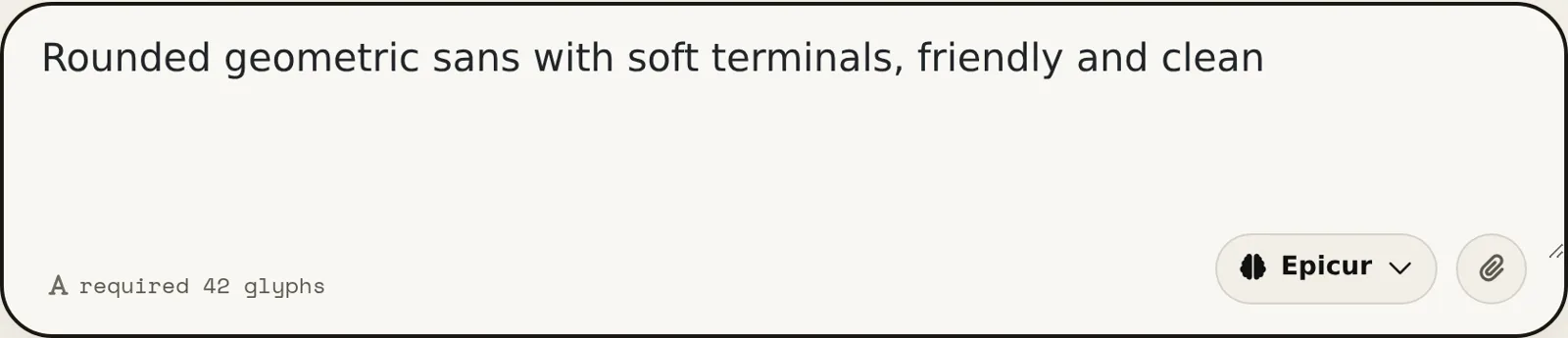
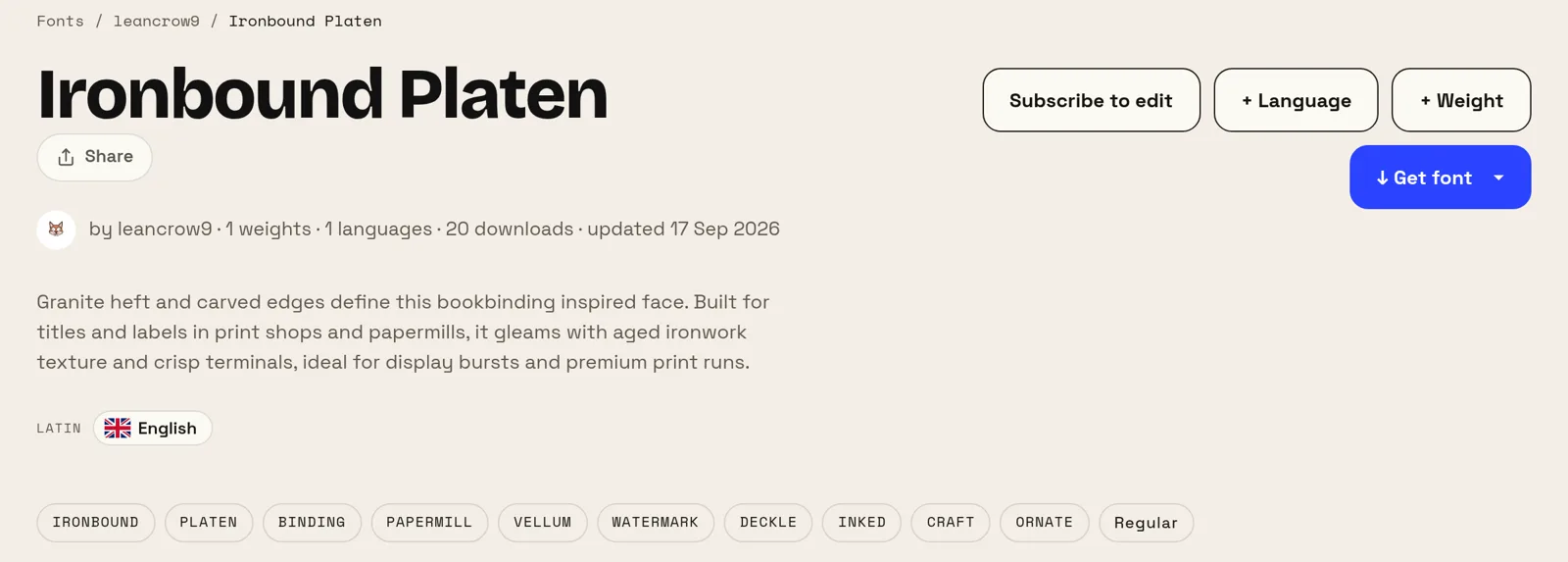
Zwou Schrëften, hei aus jeeweils engem Saz gemaach
Béid Beschreiwungen hei drënner sinn d'Wierder vun den Auteuren selwer, mat engem korrigéierten Tippfeeler. Keng vun hinne nennt eng Schrëft, e Schnëtt oder eng x-Héicht, a béid Schrëfte sinn ëffentlech op der Säit. Dir kënnt d'Resultat also selwer beuerteelen, amplaz eis ze gleewen.
Fënnef Wierder hunn déi éischt gemaach, dräizéng déi zweet. Wat déi zwee Resultater ënnerscheet, ass net d'Längt vun der Beschreiwung, mee wat se nennt: en Zweck, also Notizen oder e Fernsehsender, an eng Temperatur, also einfach oder waarm. Sot, wat d'Schrëft maache soll a wéi se sech ufille soll, an iwwerloosst d'Fachbegrëffer dem Tool.
Wou eng eege Schrëft de Fläiss wäert ass
Kleng Marken hunn dee kloersten Notzen. Eng gutt kommerziell Famill fir e Logo, eng Säit an den Drock ze lizenzéieren, kascht all Joer richteg Suen. D'Alternativ, eng gratis Google-Schrëft, ass eng Schrëft, déi Är Konkurrenz och benotzt. Eng Schrëft, déi nëmme fir Iech existéiert, hëlt béid Problemer op eemol ewech.
Si léist och e Problem, deen een net mat Suen léise kann: d'Ofdeckung. Wann Äre Produkt Russesch, Griichesch a Japanesch schwätzt, da sinn zesummepassend Famillen iwwer all dräi rar an deier. Eng eenzeg Famill iwwer d'Schrëftsystemer ze zeechnen, an deenen Dir wierklech publizéiert, ass dee Stéck, dee ganz schwéier ze kafen ass.
Weider Schrëftgeneratoren
Kyrillesch Chinesesch Japanesch Koreanesch Hebräesch Griichesch Hindi (Devanagari) Méisproocheg Maacht aus Ärer Handschrëft eng Schrëft Eng Schrëft aus engem Bild maachen Eng eege Schrëft fir Är Websäit Schrëft-Maker — Schrëft erstellen a Minutten KI-Schrëften — richteg Schrëften, keng Texteffekter Logo-Schrëftgenerator — eng ganz Schrëft aus Ärem Logo Schrëftaart-Editor online — maach Deng eege Schrëft op a änner se TTF-Editor online — .ttf-Fichier opmaachen a direkt am Browser bearbechten OTF-Editor online — .otf-Fichier opmaachen an d'Glyphen bearbechten WOFF-Editor — Webfont bearbechten, ouni se virdru ëmzewandelen WOFF2-Editor — .woff2-Fichier opmaachen an direkt am Browser korrigéieren API / MCP